Excel STOCKHISTORY Alternative: Intraday Quotes & Options Greeks Without VBA
Replace limited STOCKHISTORY formulas and brittle VBA web scrapers with 17 native =APEXTICK.* worksheet functions for batched quotes, technical indicators, and Black-Scholes options chains.
Microsoft Excel's built-in STOCKHISTORY function and linked Stocks data types are useful for basic end-of-day lookups, but quantitative analysts and options traders quickly hit four hard walls:
- No Options Chains or Greeks:
STOCKHISTORYcannot pull option strikes, implied volatility,Delta,Gamma,Theta, orVega. - No Intraday OHLCV Bars:
STOCKHISTORYonly supports daily, weekly, or monthly intervals (1m,5m,15m, and1hbars are unavailable). - No Technical Indicators or Unusual Options Screening: Computing
RSI-14,MACD,ATR-14, orRVOL-20across a 50-ticker watchlist requires giant helper sheets. - No Live Event-Driven Cell Streaming: Built-in data types require manual refresh (
Ctrl+Alt+F5) instead of pushing live trades into cells.
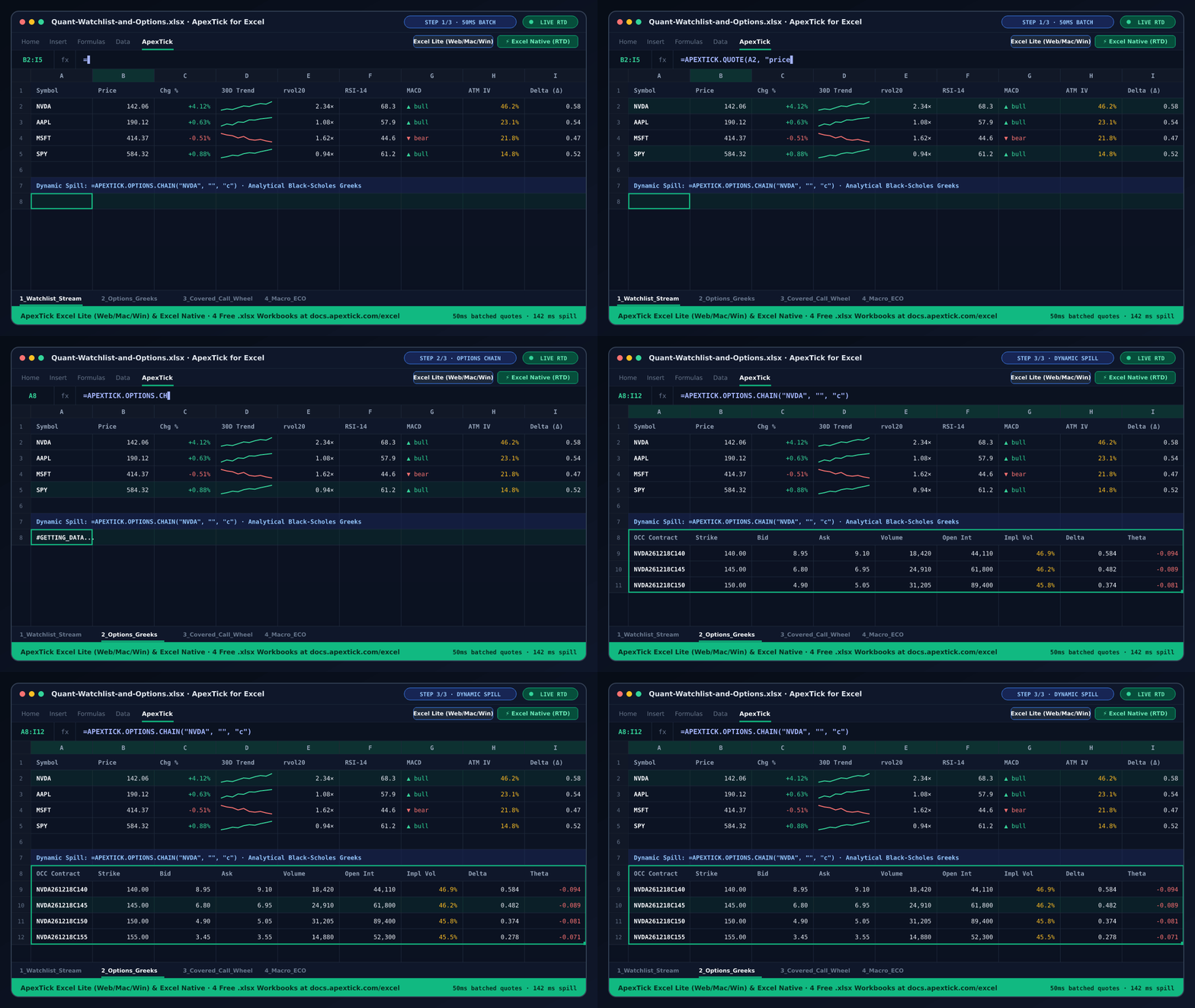
ApexTick for Excel solves all four limitations with 17 dynamic-array =APEXTICK.* worksheet functions that work in Excel on the Web (excel.office.com), Excel for Mac, and Excel for Windows—with zero VBA macros.
Side-by-Side Comparison: Excel STOCKHISTORY vs. =APEXTICK.*
| Capability | Excel STOCKHISTORY / Stocks Data Type | ApexTick for Excel (=APEXTICK.*) |
|---|---|---|
| Active intraday quotes & 50ms auto-batching | Manual refresh; slow on 50+ rows. | =APEXTICK.QUOTE("NVDA", "price") coalesces up to 50 rows into 1 HTTP call within 50ms. |
| Live event-driven streaming | Not supported. | =APEXTICK.STREAM("NVDA", "price") pushes live updates straight into cells. |
| Intraday OHLCV candles (`1m`–`1h`) | Daily/weekly/monthly only. | =APEXTICK.HISTORY("AAPL", "5m") spills Time · Open · High · Low · Close · Volume. |
| Options chains & Black-Scholes Greeks | Not supported. | =APEXTICK.OPTIONS.CHAIN("NVDA", "", "c") spills Strike, Bid, Ask, IV, Delta, Gamma, Theta, Vega. |
| Unusual options volume & IV screener | Not supported. | =APEXTICK.OPTIONS.SCREENER("NVDA", "call", 500, 500, 25). |
| Server-computed technical indicators | Requires manual formula columns. | =APEXTICK.INDICATOR("SPY", "rsi14"), "macd", "sma200", "rvol20", "atr14". |
| Company financials, earnings & ETF holdings | Limited summary fields. | =APEXTICK.FINANCIALS("AAPL"), =APEXTICK.EARNINGS("NVDA"), =APEXTICK.ETF.HOLDINGS("QQQ"). |
Common Formula Recipes
1. Build a 50-Symbol Watchlist That Updates in One Batched Request
Place your tickers in A5:A24 (AAPL, MSFT, NVDA, SPY, QQQ, ...) and fill these formulas down columns B through F:
=APEXTICK.QUOTE(A5, "price")
=APEXTICK.QUOTE(A5, "change_percent")
=APEXTICK.QUOTE(A5, "volume")
=APEXTICK.INDICATOR(A5, "rsi14")
=APEXTICK.INDICATOR(A5, "rvol20")
Because the add-in collects all APEXTICK.QUOTE calls made within a 50ms window, a 50-row watchlist executes as 1 batched API request instead of 50 separate calls.
2. Spill a Full Call or Put Options Chain with Greeks
Pick an empty cell with 12 columns of space to the right and enter:
=APEXTICK.OPTIONS.CHAIN("NVDA", "", "c")
Excel immediately spills the header row and contract table:
OCC Symbol · Type · Strike · Bid · Ask · Volume · Open Interest · Implied Volatility · Delta · Gamma · Theta · Vega
3. Screen High-Yield Covered Calls & Cash-Secured Puts
To find the 25 most active call contracts on NVDA with at least 100 contract volume and 100 open interest:
=APEXTICK.OPTIONS.SCREENER("NVDA", "call", 100, 100, 25)
Download 4 Free Ready-to-Use .xlsx Workbooks
Skip building sheets from scratch—download any of these pre-wired workbooks and open them in Excel on the Web, Mac, or Windows:
- ApexTick-Starter-and-Test-Suite.xlsx — Complete 6-tab workbook testing all 17
=APEXTICK.*functions. - Covered-Call-Wheel-Tracker.xlsx — Covered call & cash-secured put wheel tracker with 50ms batched quotes and live options screener.
- Options-IV-Greeks-Calculator.xlsx — Side-by-side Call & Put options chain analyzer with Black-Scholes Greeks.
- SP500-Tech-Watchlist-Valuation.xlsx — 20-symbol S&P 500 & Nasdaq-100 valuation and momentum watchlist.
See the Excel Add-ins Setup Guide for 60-second installation instructions.